报表参数
在设计器「查询参数设置」里声明报表参数:参数类型、默认值的三种模式(固定值、表达式、日期预设)、集合参数的写法,以及参数值的合并顺序和在表达式、SQL 中的引用方式。
概述
报表参数是报表的输入:用户在查询表单里填写的条件、外部系统通过链接传入的值,都要先在报表里声明,才会传进表达式和数据集。声明时指定参数名称、类型和默认值;用户没有提供值时,使用默认值。
声明参数
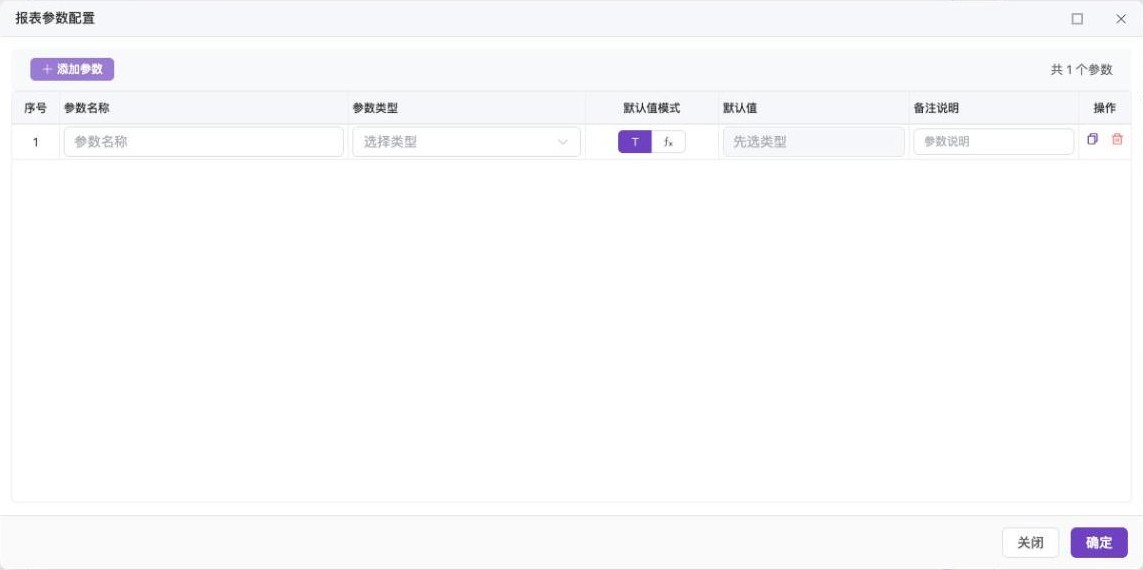
- 在设计器工具栏点「查询参数设置」,打开「报表参数配置」对话框。
- 新增一行,填写各列:
| 列 | 说明 |
|---|---|
| 参数名称 | 必填,且在同一报表内不能重复。在表达式里以 $名称 引用,建议只用英文字母、数字和下划线 |
| 参数类型 | 字符串、数值、布尔值、日期、日期时间、集合 |
| 默认值模式 | 固定值、表达式、日期预设(仅日期与日期时间类型可选) |
| 默认值 | 按默认值模式填写,见下文 |
| 备注说明 | 参数用途的文字说明 |
- 点「确定」保存。
只有在这里声明过的参数才会传进报表;请求里多出的参数不会带入表达式和数据集。(交互排序、查询过滤使用的内部参数除外,由系统自动保留。)
参数类型
| 类型 | 取值 | 输入示例 |
|---|---|---|
| 字符串 | 文本 | 内科 |
| 数值 | 数字,按十进制数值处理 | 100、3.5 |
| 布尔值 | 真或假 | true |
| 日期 | 日期 | 2026-01-05 |
| 日期时间 | 日期加时间 | 2026-01-05 08:30:00 |
| 集合 | 多个值的列表,用于 IN 查询、多选控件 |
内科,外科 |
值传入后会转换成声明的类型。
集合参数
集合类型需要再指定元素类型:「文本元素」或「数值元素」。传入值的解析规则:
- 已是数组或 JSON 数组(如
["内科","外科"]):直接使用。 - 文本:按半角逗号
,、全角逗号,、顿号、拆分,去掉每项首尾空格,丢弃空项;内科,外科、口腔得到三个元素。 - 空文本:得到空列表。
- 元素无法转成声明的元素类型(如数值元素里出现
abc)时报错。
集合参数在 SQL 里作为 IN 条件的用法见 SQL 参数与动态语法。
默认值
固定值
直接填写值,按参数类型转换。日期类型按日期格式填写。
表达式
默认值模式选「表达式」,填写一段表达式,报表运行时计算得到默认值。表达式里可以使用其他参数(取的是请求传入的值,不是它们各自的默认值),也可以调用所有内置函数。
| 需求 | 表达式 |
|---|---|
| 默认为 7 天前 | addDays(now(), -7) |
| 默认为本月月初 | monthStart(now()) |
| 默认取当前登录用户 | userAccount() |
| 结束日期默认等于开始日期 | $startDate |
表达式出错时,整张报表报错「报表参数计算错误,名称:…」,请先在预览里确认表达式能算出值。
日期预设
日期和日期时间类型可以直接选预设,省去写表达式:
| 预设 | 含义 | 适用类型 |
|---|---|---|
| 当天 | 今天 0 点 | 日期、日期时间 |
| 当天开始 | 今天 0 点 | 日期时间 |
| 当天结束 | 今天 23:59:59.999 | 日期时间 |
| 当前时间 | 运行时刻 | 日期时间 |
| 本月月初、本月月末 | 本月第一天、最后一天 | 日期、日期时间 |
| 上个月初、上个月末 | 上个月第一天、最后一天 | 日期、日期时间 |
| 本季度初、本季度末 | 本季度第一天、最后一天 | 日期、日期时间 |
| 上季度初、上季度末 | 上季度第一天、最后一天 | 日期、日期时间 |
| 本年年初、本年年末 | 本年 1 月 1 日、12 月 31 日 | 日期、日期时间 |
| 上年年初、上年年末 | 上年 1 月 1 日、12 月 31 日 | 日期、日期时间 |
新建日期类型参数默认预设为「当天」,日期时间类型默认为「当前时间」。「月末」「季度末」「年末」的具体时分秒与日期函数 monthEnd、quarterEnd、yearEnd 一致,见 日期函数。预设的取值时间以服务器当前时间为准。
取值顺序
报表运行时,每个已声明的参数按下面的顺序取值:
- 请求(查询表单、链接、嵌入调用)传入了非空的值,用传入值。
- 否则用默认值:固定值、表达式的计算结果或日期预设。
- 结果按参数类型转换(字符串、数值、日期、集合等)。
传入空值(null)与没有传入等同,都会落到默认值;传入空文本 '' 则不是 null,会作为空文本参与转换。
引用参数
| 位置 | 写法 | 说明 |
|---|---|---|
| 单元格公式与各种表达式 | $startDate |
见 报表基本语法 |
| 文本、标题 | 就诊日期从$startDate至$endDate |
自动改写为文本拼接 |
| 数据集 SQL | $startDate(等价于 ${$startDate}) |
作为绑定参数,避免 SQL 注入,见 SQL 参数与动态语法 |
| 数据集参数 | 数据集参数与报表参数的关系 | 见 数据集参数 |
| 数据集后处理脚本 | $startDate |
见 后处理脚本与计算字段 |
引用没有声明的参数不会报错,值为 null。因此参数名拼写错误往往表现为「查不到数据」而不是报错,遇到条件不生效时先检查参数名。
与查询表单配合
查询表单的控件通过绑定参数名把用户输入传给报表,控件与参数的对应见 查询表单概述 和 参数类型、默认值与传参。表单里没有填写的条件,按上面的取值顺序落到默认值。
常见问题
| 现象 | 原因 | 处理 |
|---|---|---|
| 保存时提示参数名称为空或重复 | 名称必填且唯一 | 修改名称 |
传了参数但报表里为 null |
参数没有在「报表参数配置」里声明 | 补充声明 |
| 集合参数只有一个元素 | 分隔符不是逗号、全角逗号或顿号(如分号) | 改用逗号分隔,或传 JSON 数组 |
| 日期预设选不到「当天开始」 | 该预设只用于日期时间类型 | 参数类型改为日期时间 |